Workflow
Shift Scheduler
Shift Scheduler currently manages work schedules for the entire staff at RHCJC, handles schedule change requests and approvals, and operates through Microsoft Lists.
Behind the Build
Why build this?
Student staffs have to find a balance between their work and classes. Managers need visibility across their teams. So, everyone needs a reliable process for requesting and approving schedule changes.
Shift Scheduler is built to bring those needs into one system for RHCJC. The app keeps weekly schedules, scheduled-hour totals, and change requests connected so staff and managers can work from the same information.
The Approach:
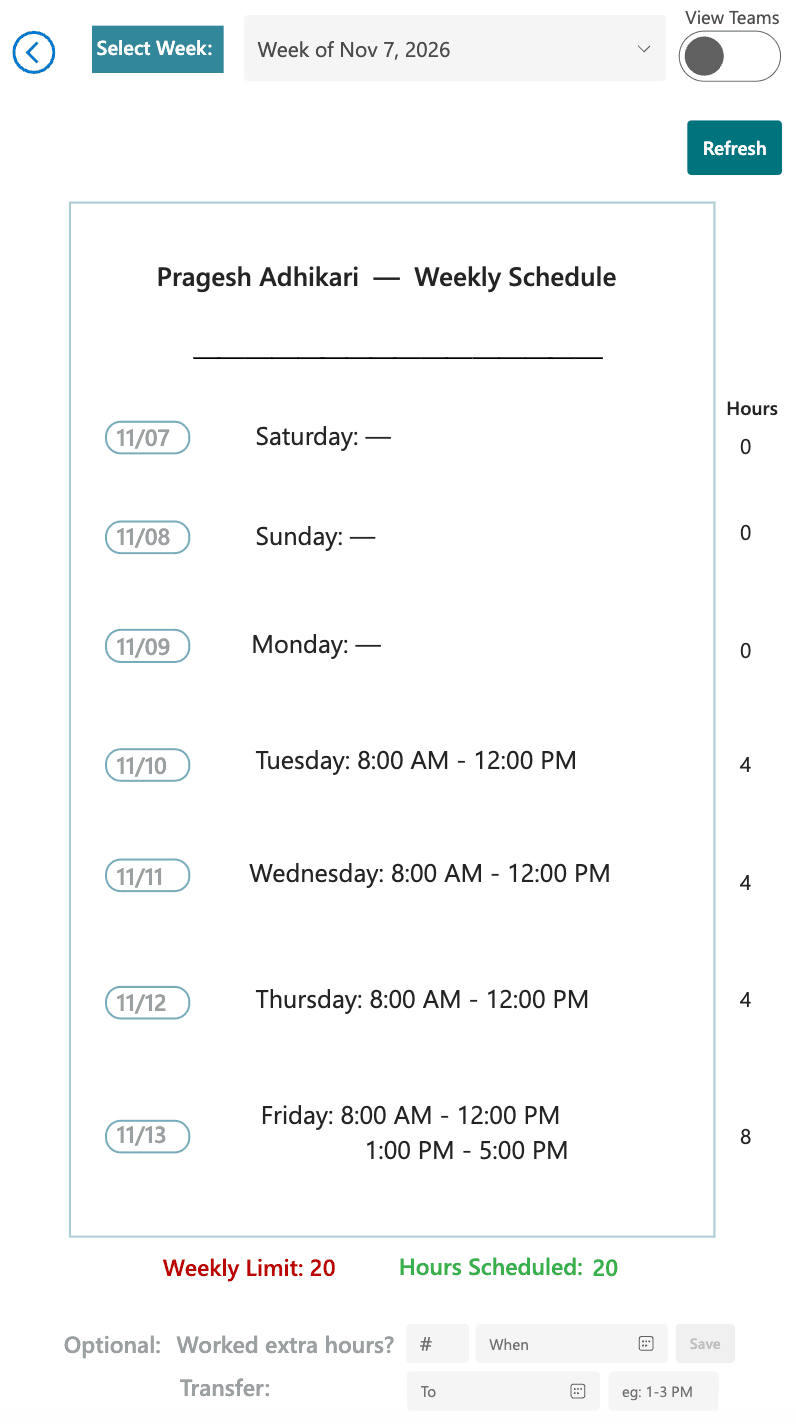
Sharepoint lists are at the heart of this application. Playing the load bearing data source role, the lists were integrated into Power Apps as the interface for viewing and managing schedules. Staff can choose a week, review each day's shift, and compare their scheduled hours with their weekly limit. A separate team view gives managers access to the broader schedule when they need it.
Power Automate supports the schedule-change and approval workflow. Keeping the interface, workflow, and underlying records connected means approved changes can remain part of the same scheduling system rather than being handled in a separate process.
Designs and decisions
I designed the main screen around a single week so the most important information is visible at a glance. Each day shows its date, assigned time range, and scheduled hours, while the weekly limit and total scheduled hours remain visible beneath the schedule.
The personal schedule is the default view, with team visibility available through a dedicated toggle. Optional controls for extra hours and transfers stay secondary to the weekly schedule, keeping the everyday experience focused while still supporting exceptions.
Results
Shift Scheduler is live and manages work schedules for the RHCJC staff. It provides a shared place to review weekly shifts, track scheduled hours, and handle schedule-change requests and approvals using Microsoft Lists, Power Apps, and Power Automate.
The screen below shows the weekly schedule view, including week selection, daily shift details, scheduled-hour totals, team visibility, and optional extra-hours transfer controls.